The short answer: almost nothing — and that's the story. Search for Wear OS apps for couples on a Galaxy Watch or Pixel Watch and you'll find generic widget mirrors and a lot of iPhone-only apps that never made the trip. Locket has no watch app. Widgetable has no watch app. Paired has no watch presence at all. Couples Check-In by Pulse is Apple-only. To our knowledge, as of mid-2026, Hueband is one of the only couples apps with a real standalone Wear OS 3+ app — Tile and watch-face complication included. Here's why the category is so empty, what the workarounds can do, and the exact setup steps.
Why Wear OS couples apps barely exist
It isn't that Android couples don't exist — it's that couples apps get built iPhone-first. The genre lives on aesthetic home screens and lock-screen culture, so studios build for iOS, maybe add an Apple Watch app, and treat Android as the port that ships late and thin. The watch is where it fully breaks down: an Apple Watch app at least reaches part of the audience, but a Wear OS app reaches "only" the Galaxy Watch and Pixel Watch crowd, so it lands at the bottom of every roadmap and usually stays there. The result is a strange vacuum: Wear OS is a mature platform on your wrist, and if you're wearing it while in a relationship, the app industry mostly forgot you.
The generic workaround: widget mirror apps
What you'll actually find on the Play Store are utilities in the "Wearable Widgets" mold: apps that mirror your phone's widgets onto the watch. They're not couples-specific — they'll mirror anything — and that's both the appeal and the limit. You get a shrunken copy of a phone widget rather than something designed for a watch: no Tile built for the glance, no complication, nothing that understands there's a person on the other end. As a stopgap for "any widget on my wrist," they do the job. As a way to feel close to your partner, they're a photocopy of a photocopy.
💡 The insight
A watch app for couples isn't a smaller phone app — it's a different promise. The wrist is for the glance: who they are, how they're feeling, how long ago. If an app can't put that in a Tile or a complication, it isn't really on your watch; it's just visiting.
Hueband on Wear OS: a real standalone watch app, Tile, and complication
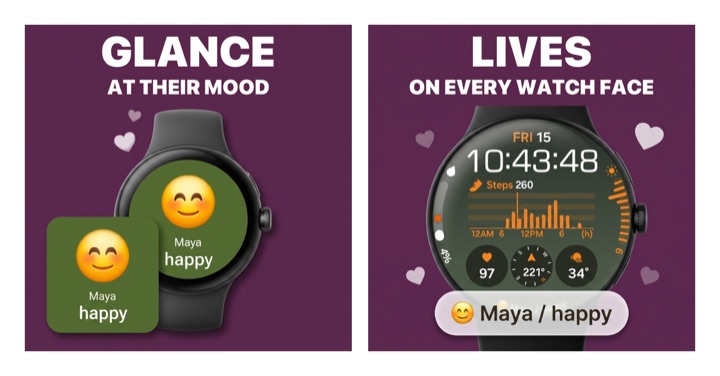
Hueband treats Android watches the way most apps treat the Apple Watch. There's a standalone Wear OS 3+ app — which covers recent Galaxy Watch and Pixel Watch models — plus a Tile one swipe from your watch face and a complication you can pin on the face itself. A glance shows your partner's current mood, chosen from 20 presets or the custom moods you two invented (any label, emoji, color), with their optional 140-character note, "the story behind it." When either of you checks in, the other sees it within seconds on watch, phone, and widget. And it's private by design: no feed, no followers, no ads on your feelings.
Set it up on a Galaxy Watch or Pixel Watch
- Install Hueband on your Android phone from Google Play, then pair with your partner using a one-time invite code.
- Install the watch app. Open the Play Store on the watch itself, search for Hueband, and install (Wear OS 3 or newer).
- Add the Tile. From the watch face, swipe to your Tiles, touch and hold, then tap the plus button and choose Hueband.
- Add the complication. Touch and hold your watch face, tap the customize option, pick a complication slot, and select Hueband.
- Test the glance. Have your partner check in — their mood should reach your wrist within seconds.
Add the couple widget on your Android home screen
- Touch and hold an empty spot on your home screen.
- Tap Widgets, then find Hueband in the list.
- Drag the widget into place. It shows your partner's latest mood and how long ago they checked in, updating with every check-in.
Mixed couple? Galaxy Watch here, iPhone there
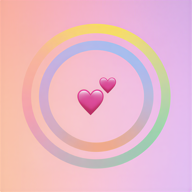
This is where Android users usually get burned: plenty of couples apps quietly assume you both carry iPhones. Hueband doesn't. You can check in from your Android phone or straight from your Wear OS watch while your partner lives on an iPhone and Apple Watch, and everything syncs both ways within seconds. Over the week, your check-ins build a shared mood ring — your days on the outer ring, theirs on the inner — with a couple sync score and 60 days of history, the same on both platforms. One subscription covers both partners automatically, so nobody argues about whose store gets the charge. The free tier (5 check-ins a day, 15 during your first week) is enough to know if the glance habit sticks; if you want the full picture of your weeks together, our widget roundup and shared mood tracker guide go deeper.
Common questions
Is there a couples app for Galaxy Watch?
Dedicated ones are genuinely rare — as of mid-2026 most couples apps ship zero Wear OS support. Hueband is, to our knowledge, one of the only couples apps with a real standalone Wear OS 3+ app, including a Tile and a watch-face complication, and it runs on recent Galaxy Watch and Pixel Watch models.
How do I get my partner's mood as a widget on Android?
Install Hueband on both phones, pair with the one-time invite code, then touch and hold an empty spot on your home screen, tap Widgets, find Hueband, and drag it into place. Every check-in updates the widget within seconds.
Does it work if my partner has an iPhone?
Yes. Mixed couples are fully supported: you're on Android and Wear OS, they're on iPhone and Apple Watch, and moods sync both directions within seconds. One subscription covers both of you automatically.