The short answer: the Apple Watch apps for couples worth knowing come down to three stories. The one everyone misses — Apple's Digital Touch heartbeat, now effectively retired. The watch-first newcomer — Couples Check-In by Pulse, promising but iOS only. And the one that puts your partner's live mood on your actual watch face — Hueband, which also happens to work when your partner carries an Android phone. Below: what each does well, and the exact steps to get your partner onto your watch face.
Why the wrist is the most intimate screen you own
Your phone is a public square: notifications, feeds, work email, forty apps yelling. Your watch is different. Nobody else sees it, nothing interrupts it, and you glance at it dozens of times a day without thinking. That makes it the perfect home for a signal from the one person you actually want ambient awareness of. A couples app on the phone is something you remember to open. A couples complication on the watch face is something you simply see — while pouring coffee, mid-meeting, walking home. The intimacy is in the zero effort.
Send your heartbeat on Apple Watch: the Digital Touch story
Ask anyone who owned an early Apple Watch what they miss and you'll hear about Digital Touch: press two fingers on the screen and your actual heartbeat thumped on your partner's wrist. It was the most romantic thing Apple ever shipped, and it quietly faded away — as of mid-2026 it has all but vanished from modern watchOS. Honestly? It was also a gimmick. A heartbeat was a one-shot buzz: gone the moment it played, carrying no information beyond "thinking of you."
But it proved something important: couples want tiny, wordless signals on the wrist. The apps below are what replaced it — trading the one-shot buzz for a persistent signal that's still there when you look down an hour later.
💡 The insight
People didn't love the heartbeat because it was a heartbeat. They loved that it was effortless, wordless, and intimate. The modern upgrade keeps all three and fixes the flaw: instead of a buzz that evaporates, your partner's current mood lives on the watch face, updated in seconds whenever they check in.
Couples Check-In by Pulse: the watch-first newcomer
Fair credit where due: Couples Check-In by Pulse is genuinely watch-first. You answer a quick check-in — mood, what you're doing, what you need — right from the Apple Watch, which is a thoughtful structure for couples who like a bit of scaffolding. It's very new as of mid-2026, and it's iOS only: no Android app and no Wear OS support, so it only works if both of you live entirely in Apple's world. If you're an all-Apple couple who wants structured check-ins more than ambient presence, it deserves a look.
Hueband: see your partner's mood on your watch face
Hueband treats the watch as a first-class citizen, not a notification mirror. There's a full Apple Watch app showing your partner's current mood, their optional one-line note, and how long ago they checked in — plus a watch-face complication and a customizable watch display, so you decide what your wrist shows. The mood itself has real range: 20 presets plus custom moods with any label, emoji, and color (your partner approves new ones, which keeps them an inside language rather than noise).
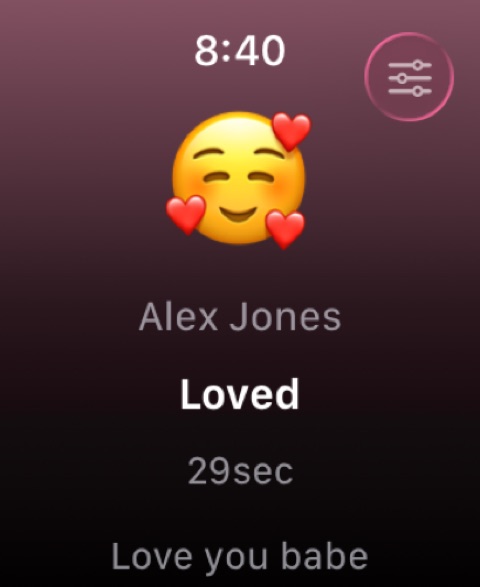
The differences that decide it for most couples: your partner sees your check-ins within seconds on their phone, watch, and home-screen widget; it stays private (no feed, no followers, no ads on feelings); one subscription covers both partners automatically; and — nearly unique in this category — your partner doesn't need an iPhone. An Android partner checks in from their phone or a Wear OS watch, and it lands on your Apple Watch all the same.
How to put your partner on your watch face
- Install Hueband on your iPhone (iOS 18+). Your partner installs it on their phone — iPhone or Android both work.
- Pair privately. Send a one-time invite code; they accept. It's just the two of you.
- Get the watch app. Open the Watch app on your iPhone and install Hueband on your Apple Watch if it hasn't installed automatically.
- Add the complication. Touch and hold your watch face, tap Edit, swipe to Complications, tap a slot, and choose Hueband.
- Customize the watch display. In Hueband, pick what your watch emphasizes so a glance shows exactly what you care about.
- Done. Next time your partner taps a mood, it's on your wrist within seconds.
What about Paired, Between, and the widget apps?
They're good at what they do — and what they do isn't the wrist. Paired offers daily questions and expert content (around $60 a year as of mid-2026) but has no live mood, widget, or watch presence. Between is a private couple space for chat, calendar, and photos, with no mood layer and no watch support. Locket and Widgetable own the phone's home screen but ship no watch app at all. If your goal is specifically an Apple Watch that keeps you two close, none of them compete for the complication slot.
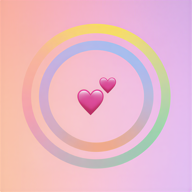
Beyond the pair, Hueband's watch app also carries your weekly mood ring story on the phone side: two rings (you outer, them inner), a couple sync score, and a per-day breakdown, so the glances add up to a picture of your week.
Common questions
Can you still send your heartbeat on Apple Watch?
Effectively no — Digital Touch heartbeats have all but disappeared from modern watchOS as of mid-2026. If what you miss is the wordless "I'm here" on the wrist, the modern replacement is a persistent one: a mood complication that always shows how your partner is doing.
How do I see my partner's mood on my Apple Watch face?
Install Hueband on your iPhone, pair with your partner's invite code, install the watch app, then touch and hold your watch face, tap Edit, swipe to Complications, and assign Hueband to a slot. Their check-ins appear there within seconds.
Do both partners need an Apple Watch, or even an iPhone?
No. Only you need the watch to see the complication. Your partner can check in from an iPhone, an Android phone, or a Wear OS watch — mixed couples are fully supported, and one subscription covers you both.