The short answer: it depends on what you want to glance at. Locket is the best photo widget, Noteit owns hand-drawn notes, Widgetable has the biggest toy box, and if you want a widget that shows how your partner is actually feeling — not just what their ceiling looks like — a couples mood widget like Hueband is the one built for that job. Here are ten options, sorted by what actually appears on your home screen.
The list at a glance
- Hueband — your partner's live mood on lock screen, home screen, and watch; iPhone and Android.
- Locket — live photos from their camera straight to your home screen.
- Noteit — hand-drawn doodles and notes on their home screen.
- Widgetable — shared pets, distance trackers, photos, and a light mood bubble.
- Your phone's built-in photo widget — the free DIY option via a shared album.
- Couples Check-In by Pulse — check-ins on the Apple Watch rather than the home screen; iOS only.
- Apple's Digital Touch heartbeat — the nostalgic ancestor, effectively retired.
- Wearable Widgets — mirrors phone widgets onto a smartwatch; not couples-specific.
- Paired — excellent daily questions, but no widget presence.
- Between — a private couple space with chat and calendar, but no widgets.
Photos or feelings? How to choose a couple widget app
Every couple widget app answers one question at a glance. A photo widget answers "what are they looking at right now?" A note widget answers "what did they want to tell me?" A mood widget answers the one that actually matters on a hard day: "how are they doing?" Photos show where your partner is. Moods show how they are. Pick the widget that answers the question you actually check your phone for.
💡 The insight
A widget you have to interpret is homework. A photo of a desk could mean "busy and thriving" or "buried and miserable" — you still have to guess. The widgets couples keep for years are the ones that carry an explicit signal, so a glance replaces the guesswork instead of adding to it.
Locket and apps like it: photo widgets for couples
Locket made the category famous: point your camera at something, tap once, and the photo lands live on your partner's (or friends') home screen widget. It's delightful, low-effort, and genuinely fun for couples who think in pictures. The honest limits: Locket is photos, not feelings — a picture of your commute doesn't tell your partner you're running on empty — and there's no watch app, so the moment lives only on the phone. If you're searching for apps like Locket for couples because you want the presence without needing a photogenic life, that's usually a sign you want a mood widget instead.
The free workaround worth knowing: both iPhone and Android can put a shared photo album into the built-in photo widget. It's slower and less alive than Locket, but it costs nothing.
Noteit: doodles on their home screen
Noteit is the hand-drawn version of the same idea: you sketch a little note and it appears in your partner's widget. It's more personal than a photo and great for inside jokes. The catch is effort — a doodle is a small art project, so most couples' usage fades after the honeymoon phase. People hunting for a Noteit widget alternative usually want one of two things: more variety (that's Widgetable) or a signal that takes one tap instead of a drawing (that's a mood widget).
Widgetable: the everything widget, including a mood bubble
Widgetable is the maximalist option: shared virtual pets, distance-between-us trackers, photo widgets, and a mood bubble where you set a little status. If you want your home screen to feel like a playground, it wins on sheer variety, and it's a fair pick for friend groups too. The honest limits for couples: the mood bubble is a side feature rather than the point — shallow next to a dedicated tracker — the app leans friend-oriented, and there's no watch app. As a mood bubble app for couples it's a sampler, not the main course.
Hueband: the widget that shows your partner's mood
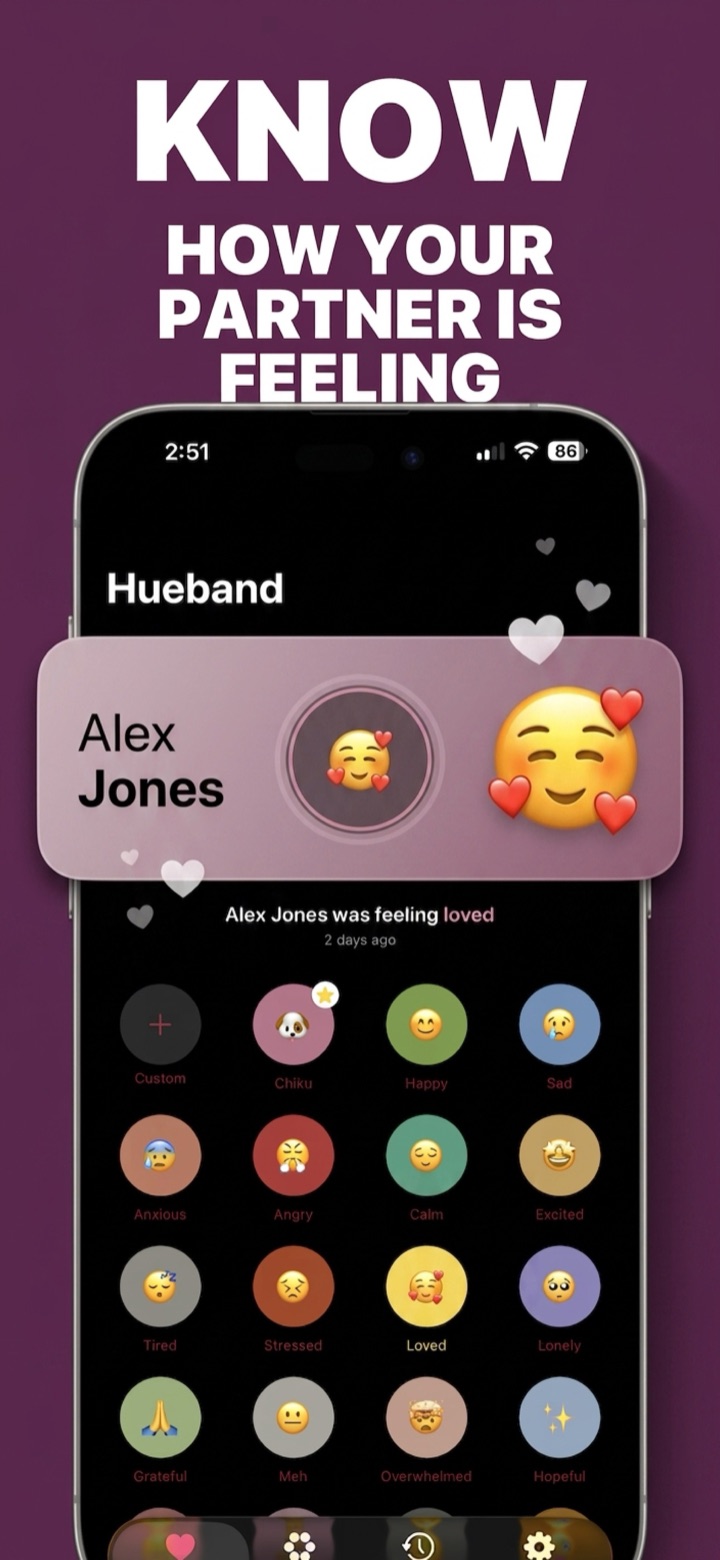
Hueband flips the category: the feeling is the content. Your partner taps one of 20 preset moods — or a custom one you two invented, with any label, emoji, and color — optionally adds a 140-character note called "the story behind it," and it reaches your widget within seconds. You get iPhone lock-screen and home-screen widgets, Android home-screen widgets, and it goes beyond the phone: an Apple Watch app and complication plus a rare full Wear OS app. It's private by design — no feed, no followers, no ads on your feelings — and one subscription covers both partners, though the free tier's 5 check-ins a day is plenty to start. Mixed iPhone-and-Android couples are fully supported, which is rarer than it should be.
How to set up a couples mood widget with Hueband
- Install on both phones. Hueband runs natively on iOS 18+ and Android, in any combination.
- Pair privately. One partner sends a one-time invite code; the other accepts. No profiles, no feed.
- Check in once each. Tap a mood so the widget has something to show.
- Add the widget on iPhone. Touch and hold the home screen, tap Edit, then Add Widget, and choose Hueband. For the lock screen: press and hold the lock screen, tap Customize, tap the widget area, and add Hueband.
- Add the widget on Android. Touch and hold an empty spot on the home screen, tap Widgets, find Hueband, and drag it into place.
- Glance. Every check-in updates the widget in seconds; a gentle nudge goes out if someone goes quiet for a while.
The ones without widgets (and when to pick them anyway)
Four names come up in every couples-app search that don't really belong in a widget roundup — worth knowing why:
- Paired is the best of the question-a-day apps: daily prompts, quizzes, and expert-written content for around $60 a year as of mid-2026. If you want structured conversations, it beats every widget app here. But there's no live mood, widget, or watch presence — it's a destination you open, not a signal you glance at.
- Between is a lovely private couple space — chat, calendar, photos — with no mood layer and no widgets or watch support. Think shared scrapbook, not ambient presence.
- Couples Check-In by Pulse does mood-style check-ins (mood, doing, need) from the Apple Watch first. Very new as of mid-2026, and iOS only, so Android partners are out.
- Apple's old Digital Touch heartbeat is the sentimental favorite people actually miss — but it was a one-shot buzz, not a persistent signal, and it has all but disappeared from modern watchOS.
Common questions
What is the best couples widget app?
Match the app to the glance: Locket for photos, Noteit for hand-drawn notes, Widgetable for pets and variety, Hueband for feelings. If the question you check your phone for is "how is my partner doing?", the mood-first option is the one that answers it.
Is there a widget that shows your partner's mood?
Yes — Hueband. Your partner taps a mood (preset or custom), optionally adds a one-line story behind it, and your lock-screen or home-screen widget updates within seconds. The same signal reaches an Apple Watch face or Wear OS watch if you wear one.
Do couple widgets work between iPhone and Android?
Not always — several popular widget apps treat one platform as an afterthought, so check both stores before you commit. Hueband is built for mixed couples: native apps on both platforms, widgets on both, and one subscription that covers both partners automatically.